
You can add smartphone open/close control, real-time door-open alerts, and local home-automation routines to a residential garage door opener without paying a monthly fee. The engineering hurdle is not finding an app—it is matching your overhead motor’s exact wall-console signaling protocol and preserving the mandatory entrapment-protection rules under CPSC 16 CFR Part 1211 and UL 325.
A residential garage door is a heavy moving barrier under high spring tension, not a table lamp. Never wire a generic smart relay across an opener’s terminals until you verify two facts: whether your motor head uses standard dry-contact pushbutton closure or encoded serial signaling (such as Chamberlain/LiftMaster Security+ 2.0), and whether the retrofit controller provides the required audible and visual pre-close warning before any unattended remote closing.
This guide was fact-checked on October 18, 2026 against U.S. Consumer Product Safety Commission (CPSC) regulations (16 CFR Part 1211), UL Solutions UL 325 technical guidance, and NIST IR 8425 consumer IoT cybersecurity standards.
Compare the three no-subscription garage control architectures
Before shopping for hardware, climb a stepladder, read the model sticker under the light cover of your overhead motor unit, and check which signaling architecture your opener uses:
| Control Architecture | How the Wall Button & Opener Communicate | Extra Adapter Required? | What Works at $0/Month | Primary Compatibility & Safety Trade-Off |
|---|---|---|---|---|
| 1. Built-In Manufacturer Wi-Fi Opener | Native radio and logic board inside the overhead motor head | None (built into motor unit) | Official smartphone app open/close, real-time status, basic push alerts | Tied to the manufacturer’s cloud account; third-party voice/local API access may be restricted or placed on paid tiers |
| 2. Dry-Contact Smart Relay Retrofit | Standard momentary contact closure across the two low-voltage wall-button screw terminals | None on dry-contact openers; cannot wire directly to encoded serial terminals | Smartphone app, HomeKit / Matter / Alexa / Google Home control, door-position history | Must include a listed UL 325 audible + flashing visual warning and a reliable wired or tilt door-position sensor |
3. Encoded Serial Wall Bus (Security+ 2.0 / Yellow Learn Button) | Digital serial data packet sent over the wall-console wires (common on post-2011 LiftMaster/Chamberlain units) | Yes: Requires either a manufacturer-listed serial adapter or a controller engineered for that protocol | Local or app control without cutting off the wall console’s motion light or timer features | Shorting the red/white terminals with a plain relay fails to move the door and resets the wall console |
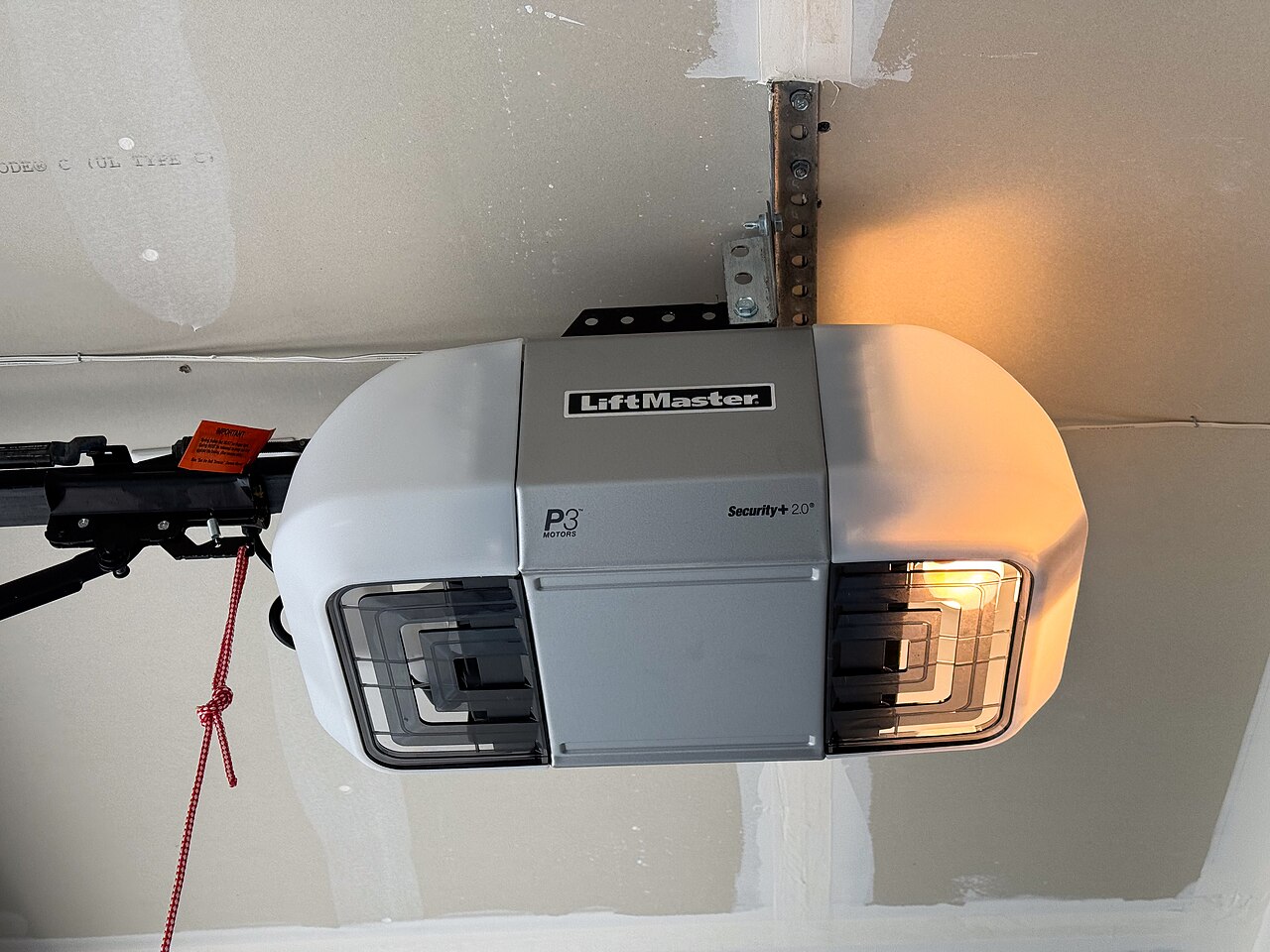 A ceiling-mounted LiftMaster P3 motor unit displaying the
Security+ 2.0 badge and red emergency manual-release cord. Openers that use encoded digital wall consoles require an approved adapter or compatible serial interface rather than a simple dry-contact relay. Photo: Tony Webster / Wikimedia Commons (CC BY 2.0).
Step 1: Check your opener’s learn button and wall-button terminals
Garage door openers that look identical from the driveway often use completely different low-voltage signaling on the ceiling unit:
- Traditional dry-contact openers: Many Genie, Linear, Overhead Door, and older LiftMaster/Chamberlain models trigger the door whenever a simple momentary switch briefly bridges the two wall-button screw terminals. Verify this by checking your opener manual or using the retrofit controller vendor’s model-lookup tool.
- Encoded digital wall-console openers (such as LiftMaster/Chamberlain
Security+ 2.0with a yellow round learn button): Instead of a simple contact closure, the wall console communicates with the motor head using an encoded digital signal over the two wires. If you wire a standard dry-contact smart relay directly across those red and white terminals, the door will not move—you will simply short out power to the wall console. To control an encoded opener safely without a subscription, the retrofit kit must include the manufacturer-specified serial interface adapter (or a listed wireless remote-emulation accessory paired to the opener’s learn button).
Always run your exact motor model number, serial/manufacture date, and learn-button color through the controller manufacturer’s compatibility checker before ordering.
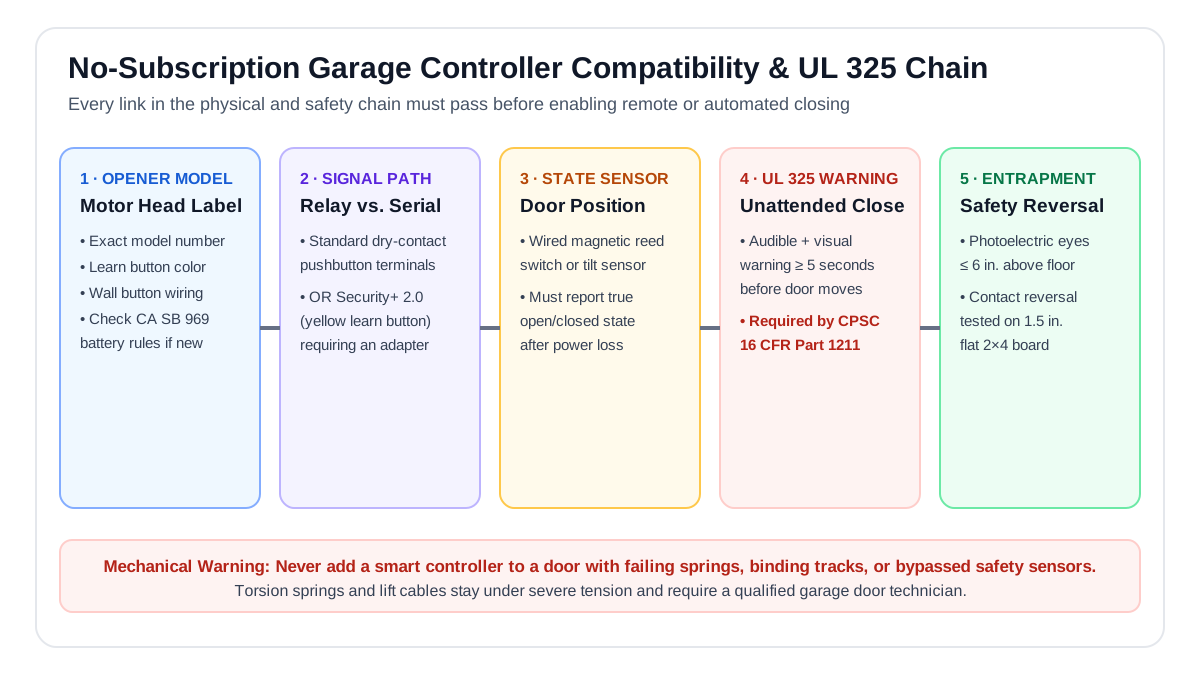 Verify all five links in sequence: exact motor model, dry-contact vs. encoded adapter path, physical door-state sensor, UL 325 5-second audible/visual pre-close warning, and photoelectric beam entrapment reversal.
Step 2: Enforce CPSC 16 CFR Part 1211 and UL 325 unattended-closing safety rules
Under mandatory federal safety rules enforced by the U.S. Consumer Product Safety Commission (16 CFR Part 1211) and the UL 325 standard for door operators, closing a garage door remotely from a smartphone app or automated schedule when you are not standing in the doorway carries strict legal and physical requirements:
- Mandatory 5-second audible and visual pre-close warning: When an unattended close command is sent from an app or automation, the system must sound an audible alarm and flash a visible light in the garage for at least 5 seconds before the door begins moving so anyone standing near the threshold is warned. Never use a bare DIY relay module that drops the door silently without a pre-close warning siren and strobe.
- Working photoelectric safety beams (
electric eyes) mounted no higher than 6 inches above the slab: The opener’s infrared safety sensors must be aligned, unobstructed, and wired directly into the motor head’s safety circuit so breaking the beam immediately reverses a closing door. - Contact-reversal test on a flat 2×4 board: As specified in opener manuals and CPSC guidance, place a 1.5-inch-thick flat piece of 2×4 lumber on the garage floor in the center of the doorway. When the door strikes the wood on its way down, it must automatically reverse within 2 seconds.
- Accurate closed-door position sensing: A smart controller only knows whether the door is open or closed via its sensor (a wired magnetic reed switch mounted on the track or a battery-powered tilt sensor on the top panel). If a dead tilt-sensor battery causes the app to think an open door is closed—or vice versa—an automated rule could open a closed garage door at midnight. Wired magnetic reed sensors eliminate coin-cell battery dropouts in freezing winter garages.
Mechanical hazard warning: Never attach a smart controller to compensate for a binding track, frayed lift cable, or broken torsion/extension spring. Garage door springs and cables remain under extreme mechanical tension that can cause severe injury; leave all spring, cable, and track repairs to a qualified garage-door technician.
What “no monthly fee” actually means for cloud vs. local control
A smart garage controller can advertise “$0/month” while still depending entirely on the vendor’s remote cloud server. Before choosing between a cloud-connected retrofit kit and a local-first controller (such as HomeKit, Matter over Wi-Fi, or a documented local LAN API), check these five operational boundaries:
- What happens when your home internet drops but local Wi-Fi stays up? A controller paired via native local protocols (Apple HomeKit, Matter, or local LAN control) can still open and close from your phone while parked in the driveway during an ISP outage, whereas a cloud-only app will time out.
- How are family members and guests invited? Garage access is physical entry into your home. Choose ecosystems that let you invite family members using their own individual accounts (with two-factor authentication) and revoke access with one tap, rather than sharing a single master password.
- Are open-left-ajar alerts and activity logs free? Verify on the manufacturer’s current plan page that “door left open for 15 minutes” push notifications and basic open/close timestamps do not require a paid tier.
- Does voice opening require a security PIN? Never allow a bedside or kitchen smart speaker to open the garage door without a spoken security passcode—otherwise someone shouting through a window could trigger the opener.
- Is California SB 969 battery backup preserved? If you live in California (or rely on a battery-backed DC opener during power outages), confirm that the smart controller’s power adapter and sensor setup do not drain the opener’s 12V backup battery or interfere with emergency manual release.
Pre-installation audit checklist
Complete this six-point verification before mounting any controller on your garage ceiling:
- Test 2.4 GHz Wi-Fi signal right at the overhead motor head with the metal garage door closed.
- Confirm exact opener model and learn-button compatibility in writing from the controller manufacturer, and order the matching serial adapter if your unit uses
Security+ 2.0or another encoded wall console. - Inspect and test the photoelectric safety sensors and run the flat 2×4 contact-reversal test before wiring the controller.
- Mount the UL 325 warning module where its flashing light and audible beeper are clearly visible and audible across the entire garage bay.
- Verify sensor state recovery after a power cut: Unplug the controller for 60 seconds, plug it back in, and confirm the app reports the true physical door state without moving the door.
- Keep a working physical entry path (exterior keypad or keyed access) so a Wi-Fi outage never locks you out of your garage.