
Almost every smart camera, video doorbell, and security kit feels feature-complete during its first 30 days because the box activates a free cloud trial during setup. On day 31—when the trial expires and you decline the monthly plan—the hardware rarely turns into a brick, but its everyday usefulness can drop overnight: saved video clips vanish, rich snapshot notifications turn into plain text banners, and person or package filtering stops working.
The smartest way to avoid subscription lock-in is to audit the permanent $0/month post-trial baseline before you drill a single mounting hole. Never judge a device by its trial-period experience or a temporary introductory plan rate.
This guide was fact-checked on October 18, 2026 against official feature-boundary documentation from Ring, Google Home / Nest, and the National Institute of Standards and Technology (NIST IR 8425). Because subscription tiers, regional prices, and retention rules change frequently, always verify the live plan table for your exact model before checkout.
Audit the 6 functional layers separately before you buy
When a manufacturer’s product page says “works without a subscription,” that statement usually means Layer 1 (Live Control) remains active while two or three other layers move behind a recurring paywall. Check all six layers independently:
| Functional Layer | What Works During the 30-Day Free Trial | What Typically Remains at $0/Month (Cloud-First Devices) | What Remains at $0/Month (Local-Storage / Local-Key Devices) | Pre-Purchase Verification Question |
|---|---|---|---|---|
| 1. Live View & Real-Time Control | Live video stream, two-way audio, remote lock/unlock | Usually kept (for example, Ring and Nest keep live view & real-time alerts at $0/mo) | Kept via app or local LAN controller | Does live view time out or lose extended modes without a plan? |
| 2. Recorded Event History | 30 to 180 days of cloud event clips (and 24/7 timeline on higher tiers) | 0 hours on Ring without a plan; 3-hour rolling event history on supported Google Nest models | Saved locally to microSD card, indoor Sync Module USB drive, or HomeBase/NVR | If I miss a delivery alert by 4 hours, can I replay the video clip for free? |
| 3. Rich Notification Previews | Animated thumbnail snapshot on phone lock screen | Often drops to a plain text alert requiring you to open the live stream immediately | Varies by brand (some generate snapshots locally; others require cloud relay) | Do lock-screen image previews require an active cloud plan? |
| 4. Smart Detection (Person / Package / Face) | Cloud AI classification for people, packages, vehicles, pets, or familiar faces | Cloud-processed AI tags typically move behind the subscription tier | Kept only when the camera/doorbell runs on-device edge AI classification | Is person/package detection processed on the device chip or in the paid cloud? |
| 5. Automations & Cellular Backup | Multi-device routines, professional monitoring, cellular alarm fallback | Basic schedules usually remain; cellular backup and professional dispatch require a plan | Local hubs (HomeKit, Matter, Home Assistant) run automations on the home LAN | Will my routines stop running if I cancel the vendor’s cloud plan? |
| 6. Household & Guest Access | Shared family logins, temporary guest PINs, activity logs | Basic shared user invites or PIN codes usually stay; detailed audit history may shrink | Local PIN codes and physical keys remain active; check app role granularity | Can family members still receive alerts and manage guest PINs at $0/mo? |
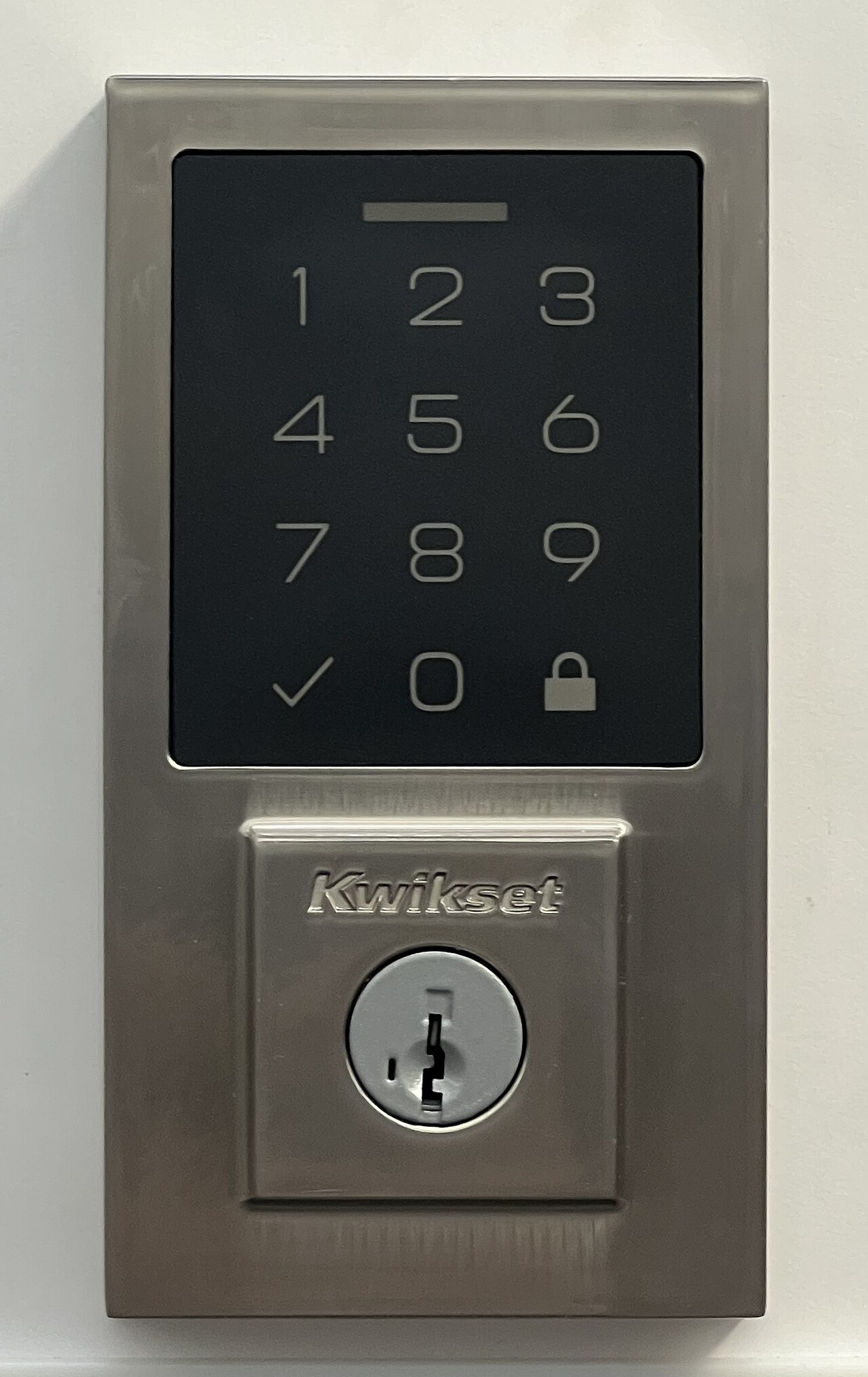 A residential keypad deadbolt lock hardware example (Kwikset 270). Devices featuring onboard PIN-code memory and a mechanical key cylinder preserve core physical entry control at $0/month even if companion cloud subscriptions, remote bridges, or home internet connections are discontinued. Photo: TaurusEmerald / Wikimedia Commons (CC BY-SA 4.0).
Run the “4-hour missed package test” on cameras and doorbells
For any security camera or video doorbell, marketing bullets about 2K resolution and wide field of view matter far less than what happens when a courier drops off a box at 1:00 p.m. and you cannot check your phone until 5:00 p.m.
Official manufacturer documentation shows how sharply post-trial behavior diverges at that 4-hour mark:
- Ring doorbells and cameras (
Ring Homeplans): According to Ring’s official FAQ on features available with and without a subscription, unsubscribed users receive real-time notifications, Live View, and two-way talk as events happen—but zero video recordings are saved or playable afterward without a compatible subscription. If you miss the live alert, the event is gone. - Google Nest cameras and doorbells (
Google Home Premium/ formerly Nest Aware): According to Google’s official documentation, newer Nest cameras and the Nest Doorbell (battery) include up to 3 hours of rolling event video history without a subscription, while 30-day or 60-day event history and 24/7 continuous recording require a paid Google Home Premium plan. Under a 3-hour window, an event at 1:00 p.m. has already expired by 5:00 p.m.—and any overnight motion at 2:00 a.m. disappears before you wake up at 6:00 a.m. - Local microSD or indoor hub-storage models: Systems that write clips directly to a microSD card or an indoor USB hub module retain playable recordings for weeks or months at
$0/month—provided you buy the required storage media and keep the hub powered.
If your household’s primary goal is reviewing overnight activity or checking deliveries hours after they arrive, a live-only or 3-hour rolling buffer is not a true $0/month security camera solution.
Local storage vs. cloud subscriptions: trading a monthly bill for hardware upkeep
Eliminating a monthly cloud bill is a completely valid goal, but local storage shifts the responsibility for data survival onto the homeowner. Before choosing a local-storage ecosystem, check five physical trade-offs:
- Upfront hub and media costs: Many “no monthly fee” cameras do not include storage media in the box. You must factor in a high-endurance microSD card (rated for continuous video overwrite cycles, typically 64 GB to 256 GB), an indoor USB flash drive + sync module, or a dedicated home base station.
- Outdoor theft vs. indoor storage boundary: If a camera or doorbell stores clips only on a microSD card slotted into the outdoor housing and an intruder pries the unit off the wall, the footage leaves with the thief. Storing local clips on an indoor hub, Sync Module, HomeBase, or NAS/NVR protects the recording even if the exterior camera is damaged.
- Clip loading speed and remote relay: Playing back a clip stored on a low-power indoor USB hub over a remote cellular connection still routes through the manufacturer’s encrypted relay server and often loads more slowly than a cloud-cached video stream.
- Card wear and silent failure: Standard consumer SD cards fail prematurely under constant video loop recording. Check that the app alerts you immediately if the storage card becomes read-only, full, or unformatted.
- Cancellation data-deletion rules: If you ever use a paid cloud plan and decide to cancel later, read the vendor’s cancellation policy first—many cloud services permanently delete all stored cloud clips the moment a subscription ends unless you download them to your phone or computer beforehand.
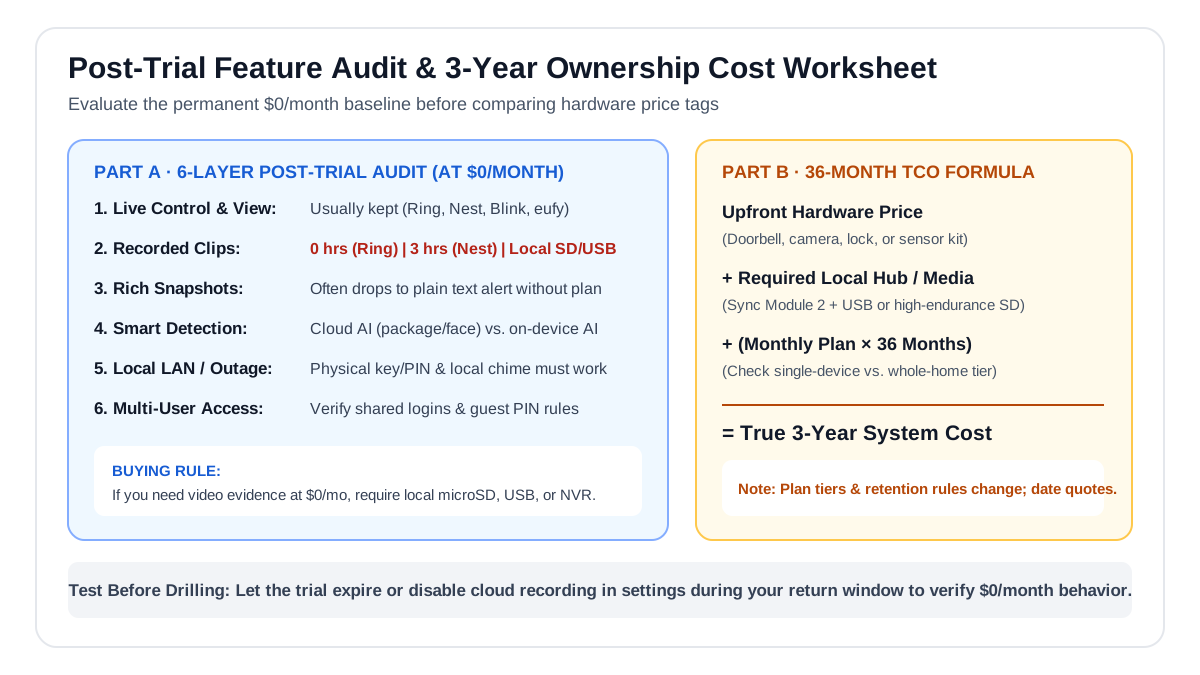 Compare the permanent $0/month feature baseline across all six layers, then calculate true 36-month ownership cost using live hardware, hub/media, and multi-device plan pricing.
How to calculate true 3-year ownership cost with live quotes
Because manufacturers regularly adjust monthly plan rates, rename subscription tiers, and change whether a plan covers one single device or an unlimited number of cameras at one home address, any static dollar table printed in an old blog post will quickly go stale.
Run this exact 36-month worksheet using today’s live product and plan pages prior to purchase:
3-Year Ownership Cost = Upfront Device Hardware Price
                      + Required Local Hub / High-Endurance SD or USB Media
                      + Professional Installation (if required)
                      + (36 Months × Current Monthly Plan Rate, or 3 × Annual Rate)
Compare three specific scenarios for your home:
- Scenario A (1 Doorbell Only): A single cloud camera on a basic single-device plan vs. a slightly more expensive local-storage doorbell with a 128 GB high-endurance microSD card.
- Scenario B (1 Doorbell + 3 Outdoor Cameras): Check whether the brand charges per camera or offers a whole-home flat rate—and compare that 3-year subscription total against a multi-camera local HomeBase or PoE NVR kit.
- Scenario C ($0/Month Post-Trial Baseline): Verify whether the free tier genuinely satisfies your household without paying for a plan at all.
How to test the post-trial experience during your return window
Do not wait until day 31—often one day after a retailer’s 30-day return window closes—to discover what your new device loses without a subscription:
- Screenshot the dated plan and feature matrix for your exact hardware model and country before ordering.
- Keep all packaging, mounting brackets, and factory reset pins intact during the first week of testing.
- Disable or pause the free cloud trial inside the app settings (or test with local storage only) for 48 hours before drilling permanent holes into brick or siding.
- Verify local physical fallback: Unplug your internet modem for 10 minutes and confirm that smart locks still open via physical key and keypad PIN, thermostats still regulate temperature from the wall, and indoor doorbells still ring a local chime.
- Review cybersecurity and support commitments: As recommended in NIST IR 8425 (Profile of the IoT Core Baseline for Consumer IoT Products), verify that the manufacturer documents how security firmware updates are delivered and whether basic security patches remain free regardless of subscription status.